


Mac users have no shortage of small utility apps. One application manages windows. Another keeps the Mac awake. A third controls individual app volumes. Then there’s a clipboard manager, system monitor, screenshot utility, uninstaller, file shelf, and application switcher.
Vorssaint takes a different approach: put those tools behind one menu bar icon instead.
Vorssaint is a free and open-source macOS menu bar toolkit. Instead of requiring a collection of separate apps for common Mac improvements, it brings a large range of everyday tools together in one application while keeping them optional.
You can install the features you want and remove the ones you do not use. According to the project documentation, removing a feature prevents it from loading and consuming resources, while its previous settings can remain available if you decide to reinstall it later.
The result is an interesting option for Mac users who have gradually accumulated several menu bar utilities and would rather manage those tasks from one place.
What Is Vorssaint?
Vorssaint is an open-source utility suite built specifically for macOS. It lives primarily in the menu bar and combines functionality that would normally require several separate applications.
Its feature list stretches across audio control, system monitoring, window management, mouse and keyboard customization, clipboard tools, file handling, screenshots, screen recording, app maintenance, display management, and automation.
The project also takes a local-first approach. There is no required account, and the project’s privacy documentation says settings and saved state remain on the Mac rather than being uploaded. Clipboard history and screen text recognition are also handled locally.
That makes Vorssaint different from a typical cloud-connected productivity suite. Most of its value comes from making macOS itself easier to control.
Another major difference is pricing. Vorssaint is free, and its source code is available publicly under the GPL-3.0-or-later license.
In practical terms, it is better to think of Vorssaint as a customizable Mac toolbox rather than one narrowly focused application.
Why One Menu Bar App Can Replace Several Mac Utilities
The strongest argument for Vorssaint is not that every individual feature is completely new. It is that so many useful features live in one coherent application.
A typical power-user setup might include a window snapping tool, clipboard manager, system monitor, keep-awake app, application uninstaller, and volume mixer. Each program brings its own settings, background process, update system, keyboard shortcuts, and possibly another menu bar icon.
Vorssaint tries to consolidate that stack.
That can make a noticeable difference to organization. Instead of remembering which application controls a particular behavior, most functions can be managed through the same interface. Global shortcuts can also be reviewed from one categorized settings area.
Consolidation has another advantage: different tools can work together. The Command Bar, for example, is not limited to launching apps. It can interact with Vorssaint actions, windows, snippets, and clipboard history.
For users who already depend on highly specialized professional applications, Vorssaint may not replace every one of them. For common daily Mac tasks, however, the breadth of the toolkit is impressive.
Install Only the Features You Actually Use
One of Vorssaint’s more useful design choices is its modular Features system.
You do not have to run the entire toolkit.
The Features page allows individual components to be installed or removed. Removing a feature makes it disappear from the application and prevents it from loading, so unused tools do not need to consume CPU, memory, or energy.
Initial setup also provides bundles for common configurations alongside a visual feature picker. This makes the first launch less intimidating because you do not need to understand every available utility before getting started.
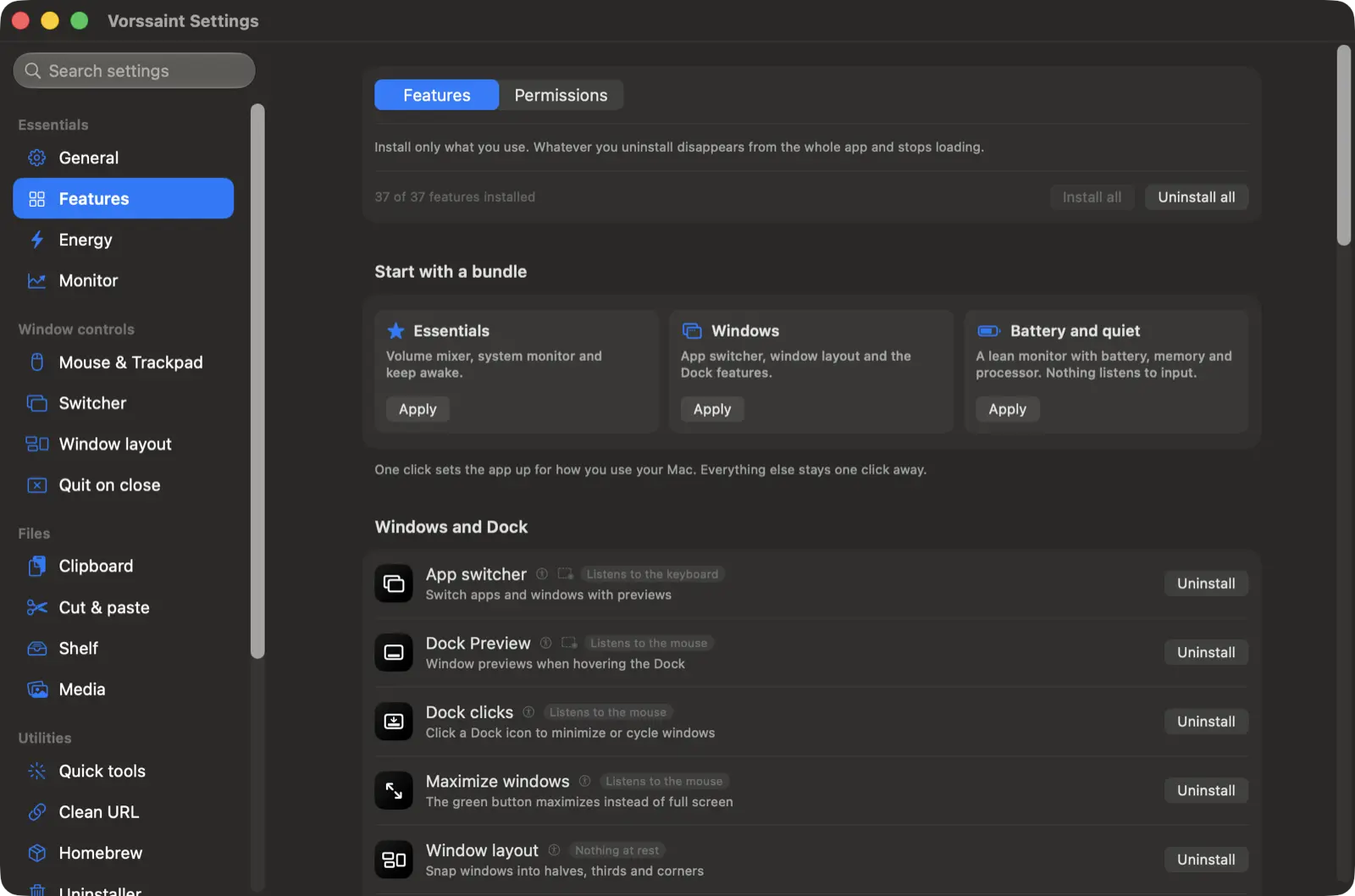
This modular approach is especially important for an application with such a large feature list. Rather than forcing every component onto every user, Vorssaint can be shaped around a particular workflow.
If you only want window management, clipboard history, and audio controls, you can keep your setup focused on those tools. If you later decide that you also want system monitoring or screen recording, the additional features can be installed when needed.
Per-App Volume and Better Mac Audio Controls
macOS provides straightforward system volume controls, but users who want detailed control over individual applications often need additional software.
Vorssaint includes a volume mixer that lets you change the overall Mac volume or adjust individual applications independently.
That means a video call can remain loud while music plays quietly in the background. A particularly quiet application can even be pushed beyond the normal 100 percent level where supported by the feature.
There is also per-app output routing. For example, music could be sent to speakers while a communication app uses a headset.
Other audio utilities include a shortcut-based output switcher, microphone controls, and an option designed to stop Apple’s Music app from automatically appearing when headphones connect.
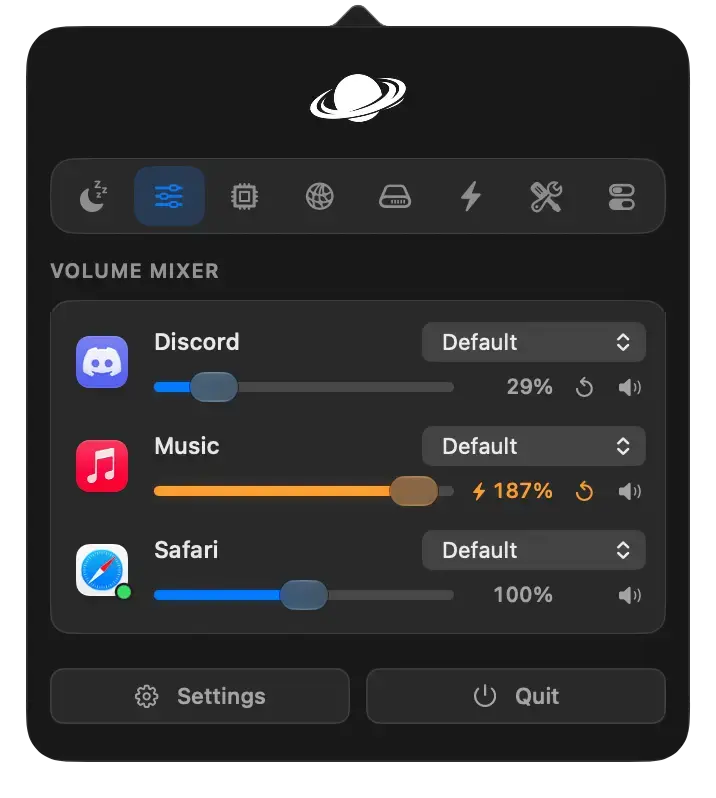
For users already running a separate application purely for per-app audio management, this feature could potentially replace another menu bar utility.
A Built-In System Monitor for CPU, Memory, Temperature and Network Activity
Vorssaint can also turn its menu bar panel into a compact system monitoring dashboard.
It can display CPU and GPU activity, memory usage, swap usage, system temperatures, and historical graphs. Battery information includes charge level, temperature, health, estimated remaining time, cycle count, and power draw.
Network monitoring provides live transfer rates and session totals, while a built-in speed test offers another way to check connection performance without opening a browser.
Optional alerts can warn about conditions such as sustained CPU load, high temperatures, memory pressure, low storage, or low battery.
Some statistics can also be placed directly in the macOS menu bar, allowing important readings to remain visible without opening the full panel.
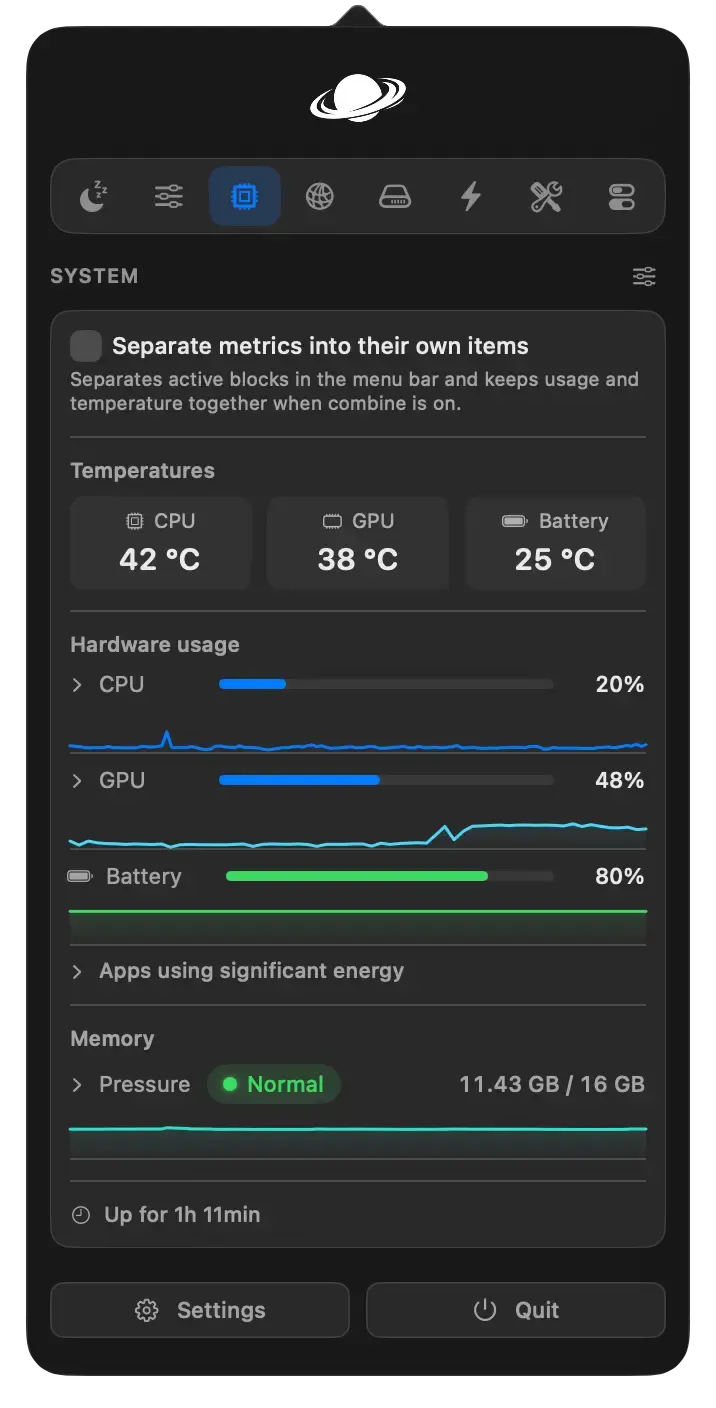
For users who want a quick overview rather than the depth of a dedicated professional hardware-monitoring package, the built-in system monitor covers a useful middle ground.
Better Window Management and Dock Controls
Window management is another substantial part of Vorssaint.
The Window Layout feature can snap the active window into halves, thirds, sixths, corners, or a centered position. Users can configure gaps around windows, maximize a window without necessarily creating another macOS Space, and move windows between displays.
Edge snapping adds the familiar behavior of dragging a window toward an edge or corner and seeing a layout preview.
There are also options for moving and resizing windows using combinations of the mouse and modifier keys.
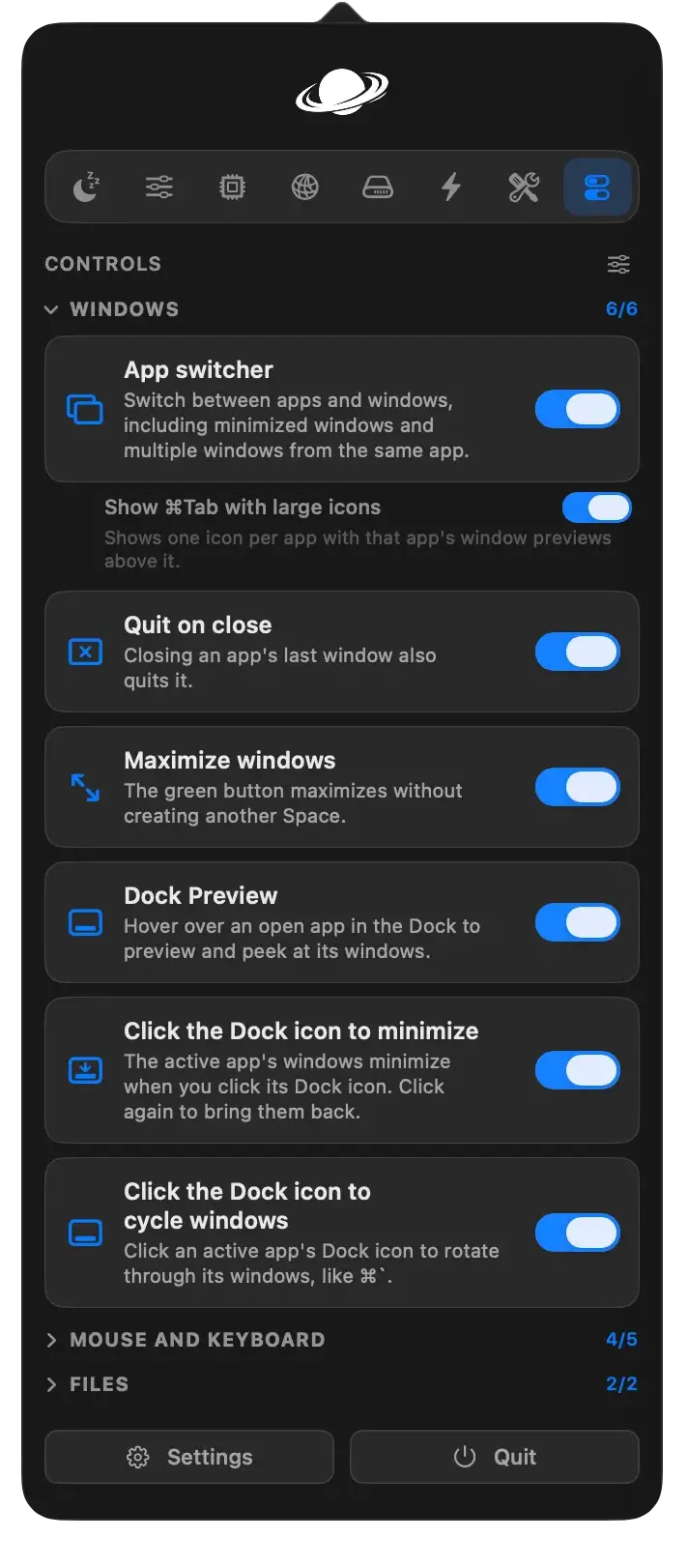
Vorssaint extends its window controls into the Dock as well. Dock Preview can display thumbnails when you hover over an application’s Dock icon. Those previews can then be used to select, move, or close individual windows.
Other conveniences include changing what happens when the active application’s Dock icon is clicked, quitting selected applications when their last window closes, and adding additional protection against accidental Command-Q or Command-W actions.
A More Powerful Alternative to Command-Tab
The application switcher goes beyond the traditional macOS Command-Tab interface.
Instead of presenting only application icons, it can show live window thumbnails, including multiple windows belonging to the same application and minimized windows.
Users can adjust how the switcher behaves across multiple monitors and create per-app rules for which applications or windows appear.
A simpler mode is also available for people who want a more straightforward list without live screen previews.
Window Snapping, Dock Previews and Window Shortcuts
The window tools are useful because Vorssaint does not force everyone into a single workflow.
Keyboard users can rely heavily on shortcuts. Mouse users can enable edge snapping and modifier-assisted movement. Multi-monitor users can move windows from one display to another.
Dock Preview provides another route for users who naturally navigate through the Dock.
The ability to combine these behaviors within one application is more interesting than any single layout preset. Someone could use keyboard shortcuts for a two-column working arrangement during the day but rely on Dock previews when many documents from the same application are open.
Taken together, these options make Vorssaint much closer to a complete window-management package than a basic left-half and right-half snapping tool.
Keyboard and Mouse Customization
Vorssaint contains a surprisingly deep collection of input customization tools.
Mouse users can enable smooth scrolling, change pointer acceleration, invert vertical or horizontal wheel movement, and make additional mouse buttons useful in supported applications.
Extra buttons can also be assigned keyboard combinations or actions such as switching Spaces and opening Mission Control.
A three-finger press can be converted into a middle click.
There are practical hardware-related features as well. An extra-click filter can reduce accidental repeated clicks from worn mouse buttons, while key debounce is designed to filter unintended duplicate letters from aging keyboards.
One of the more unusual tools is Super Key. It can turn Caps Lock or selected modifier keys into a custom modifier combination while still assigning a separate action to a quick tap.
Text snippets are also part of the workflow. Short triggers can automatically expand into longer text, with support for dynamic clipboard, date, and time information.
These may not be headline features individually, but together they can remove small points of friction that occur many times throughout a normal working day.
Clipboard History, File Shelf and Finder Improvements
Clipboard history is one of those utilities that can become difficult to live without once it becomes part of a workflow.
Vorssaint stores a local history of copied text, images, and files, with search, favorites, and quick-paste options. Text can also be previewed and edited before reuse.
An automatic clearing feature can empty the current system clipboard after a chosen amount of time or following events such as sleep or screen locking while leaving saved history entries untouched.
There is also a Paste as Plain Text action for stripping unwanted formatting.
The Shelf approaches file management from another direction. Files, links, or pieces of text can be temporarily parked near the pointer during drag-and-drop operations and then moved somewhere else later.
Finder receives several quality-of-life improvements as well, including Windows-like Command-X and Command-V file moving and an optional F2 shortcut for renaming.
Clean URL can remove tracking parameters from copied links, while the disk-image installer streamlines the familiar process of installing an app from a mounted DMG.
It is a good example of Vorssaint’s overall strategy: solve many small macOS annoyances instead of focusing on one giant problem.
Command Bar and Everyday Mac Utilities
The Command Bar is one of the broader features included in the application.
A keyboard shortcut opens a search field over the current application. From there, users can run Vorssaint actions, launch applications, switch windows, insert snippets, and retrieve clipboard items.
It can also expose commands from the menus of the application currently being used.
Basic calculations, conversions, and date-related queries can be handled directly in the interface. Local scripts can be attached to shortcuts, and selected folders can be searched using the Mac’s own search capabilities without Vorssaint building a broad independent index.
The application also includes a Quick Panel and a collection of quick system toggles.
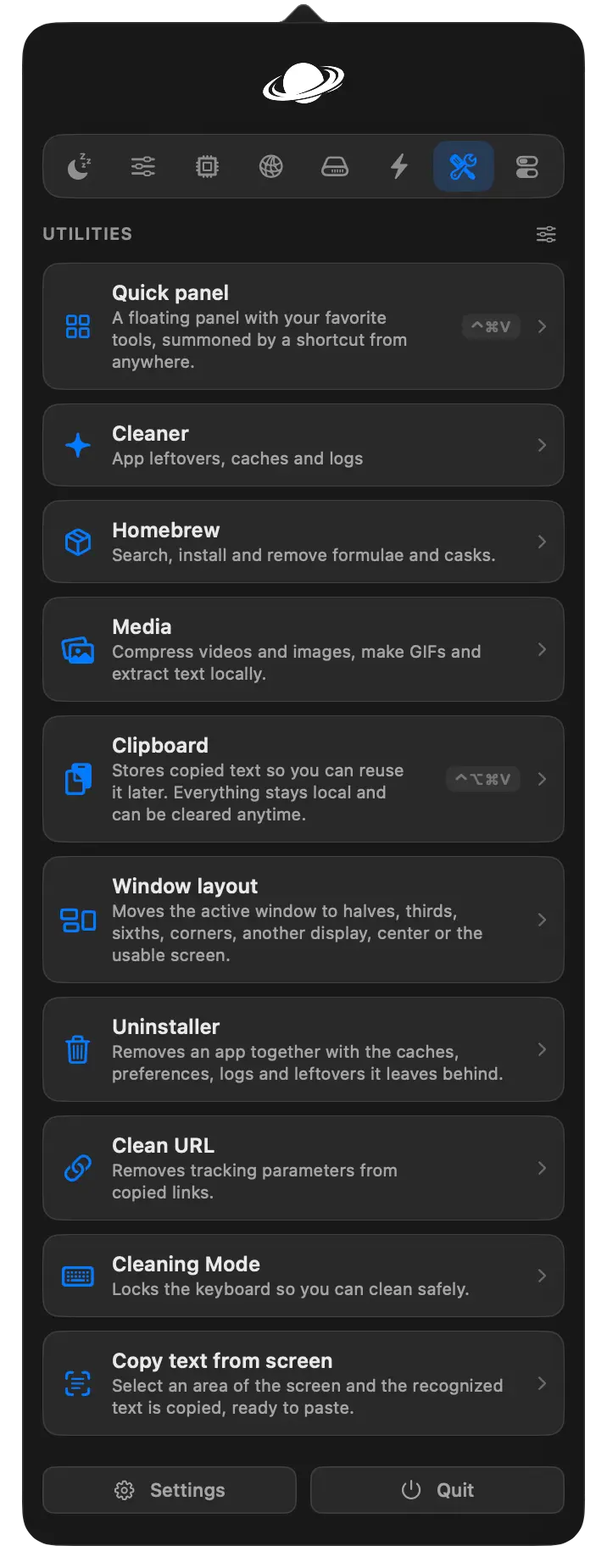
Other utilities include a radial action menu, scratchpad, camera preview, color picker, and offline screen-text recognition.
The sheer breadth means most people probably will not use every tool. Fortunately, that is exactly why the modular feature system matters.
Screenshots, Screen Recording and Visual Tools
Screen capture has developed into a substantial part of Vorssaint.
Screenshots can cover a selected area, window, or complete display. The project also supports manually capturing longer scrolling pages or documents.
A quick preview lets users copy, save, or delete the image or move into an editor with annotation, cropping, redaction, and background tools.
Screen recording supports a selected area, individual window, or full display with optional system and microphone audio.
The editor can trim footage, make cuts, smooth pointer movement, introduce automatic zooms, add text and images, and blur private information.
Finished recordings can be exported as video or GIF files. The project also supports temporary sharing links for some captures.
Screenshot capture, recording, screen-text recognition, and color picking share a common screen-selection interface, which helps the different tools feel like parts of one capture system rather than unrelated utilities.
Cleaner, Uninstaller, Media Tools and Homebrew Management
Vorssaint is not limited to productivity tools. It also includes several utilities for maintaining applications and files.
The Cleaner can look for application leftovers, caches, and logs.
The Uninstaller takes a more focused approach: drop an application into it and Vorssaint can identify associated preferences, caches, containers, plugins, and other related files. Related results begin unchecked so users can review them before removal.
Media tools cover tasks such as video compression, trimming, cropping, image conversion, resizing, watermarking, GIF creation, and text extraction.
There is even a Homebrew manager for searching, installing, and removing formulae and casks without working directly in Terminal.
For technically minded users, that does not eliminate the usefulness of Homebrew’s command-line interface. It simply makes routine package management more approachable.
This section also highlights what makes Vorssaint unusual. Few applications move naturally from window snapping to clipboard history to Homebrew management and video compression while still presenting themselves as one menu bar utility.
Power, Battery and Display Controls
Vorssaint includes several features aimed at MacBook and multi-display users.
Keep Awake can prevent the Mac from sleeping temporarily or while certain conditions are true. Sessions can be based on a timer, power connection, external display, or selected running applications.
Display controls can change brightness and manage individual connected screens. External monitors use their supported hardware controls when possible, with software dimming available as a fallback in other situations.
Supported MacBook Pro models can also access an Extra Brightness option that makes use of available XDR display headroom.
Another small but clever option is Bluetooth on Sleep. Its purpose is to prevent a sleeping MacBook from continuing to interfere with Bluetooth devices that you want to use elsewhere.
These features are not as visually dramatic as the app switcher, but they are exactly the kind of functions that often cause Mac users to install additional menu bar applications.
Privacy and macOS Permissions
A utility with access to windows, microphones, screen recording, clipboard contents, and files deserves close scrutiny.
Vorssaint’s approach is explicitly local-first. The project says it does not require an account and does not include analytics or tracking. Network access is reserved for visible functions such as update checks, speed tests, Homebrew actions, temporary capture-sharing links, and information the user explicitly sends.
Permissions are also tied to individual features rather than treated as one blanket requirement.
Accessibility is needed for functions including certain window, Dock, mouse, keyboard, and snippet features. Screen Recording is required for live window previews and capture functions. System Audio Recording is used by per-app audio features, while microphone access is only required when recording a voice track.
That distinction matters because a user who only enables a small part of Vorssaint does not necessarily need to grant access for every capability the complete toolkit can offer.
How to Install Vorssaint
The easiest installation method for users who already use Homebrew is:
brew install --cask vorssaintThe project also publishes a disk image for users who prefer the normal macOS drag-to-Applications installation process.
Official builds are signed with an Apple Developer ID and notarized.
For Homebrew installations, removal is equally straightforward:
brew uninstall --cask vorssaintThe repository also provides an uninstall script for users who want to remove settings and permissions associated with the application.
Installation itself is therefore conventional. The more important step comes after launching Vorssaint: choosing only the features that actually make sense for your workflow.
Starting with a smaller set is sensible. A volume mixer, system monitor, clipboard history, and window manager already demonstrate much of the application’s value without exposing a new user to every available setting at once.
System Requirements and Building From Source
Vorssaint currently requires an Apple Silicon Mac running macOS 14 Sonoma or newer. Intel Macs are not listed as supported by the project.
Developers can also build the application themselves.
The repository provides a build script, with Xcode Command Line Tools listed as the required development tooling. The contributing documentation describes the project as using a direct Swift compiler workflow without an Xcode project or external dependencies.
A typical source installation starts by cloning the repository and running its build script.
That open development model is particularly useful for an application that can request powerful macOS permissions. Developers and technically inclined users can inspect the code, review changes, report issues, and contribute through the public repository.
The project also maintains documentation covering contributing, security, troubleshooting, permissions, and privacy.
Who Is Vorssaint Best For?
Vorssaint makes the most sense for Mac users who enjoy customizing the operating system beyond Apple’s defaults.
It is particularly relevant if you already use several small utilities for tasks such as:
- Window snapping
- Clipboard history
- Per-application volume
- Keeping the Mac awake
- Monitoring CPU and memory usage
- Better application switching
- Screenshots and screen recordings
- Uninstalling applications cleanly
- Mouse customization
- Text expansion
- Display controls
- Quick system toggles
The savings are not purely financial.
Reducing the number of independent menu bar applications also means fewer preference screens, shortcuts, update systems, and background processes to keep track of.
Developers and power users are likely to appreciate the deeper options, particularly Homebrew integration, source availability, system statistics, and keyboard customization.
At the same time, the visual feature installer makes the project accessible to people who do not want to become macOS automation experts.
You can essentially build your own version of Vorssaint from the available feature list.
What to Consider Before Installing It
The size of the feature set is both Vorssaint’s biggest strength and the main reason to approach it thoughtfully.
A person who only needs basic window snapping may prefer a tiny single-purpose tool. Likewise, specialized applications dedicated entirely to screen recording, hardware monitoring, or automation may offer deeper functionality in their particular fields.
Vorssaint’s main advantage is consolidation.
There is also the operating-system limitation to consider. You need an Apple Silicon Mac with macOS 14 or newer, which excludes older Intel machines.
Some advanced functionality naturally requires macOS permissions such as Accessibility, Screen Recording, or System Audio Recording. Those permissions are not necessary for every feature, and the application documents which components depend on them.
The best way to evaluate the project is therefore not to ask whether you will use everything Vorssaint contains.
Instead, ask how many applications already sitting in your menu bar it could replace.
If the answer is three, four, or five, the proposition becomes much more interesting.
Is Vorssaint Worth Using?
For the right Mac user, Vorssaint has a lot to offer.
The appeal is not one revolutionary feature. It is the decision to combine a large collection of useful macOS improvements into a free, open-source, and modular application.
Per-app volume, system monitoring, better window switching, snapping, clipboard history, screenshots, screen recording, file tools, uninstalling, mouse customization, display controls, and dozens of smaller conveniences can all live behind the same menu bar icon.
More importantly, you do not have to activate all of them.
That modular philosophy keeps Vorssaint from feeling like an all-or-nothing bundle. Install the features that improve your workflow, ignore the ones that do not, and add more later if they become useful.
For Mac users who routinely install small applications to fix individual macOS annoyances, Vorssaint offers many of those utilities in a single open-source application.
You can view the project, documentation, source code, and current releases on Vorssaint’s GitHub repository.
